When to Use No-Code Tools vs Traditional Development: Ideal Use Cases Explained
Understand no-code vs traditional development with clear use cases. Learn when to choose speed and flexibility or full customization for your product.
Dec 21, 2025
Statistics show that 80% of projects using traditional development miss their deadlines. Software development practices are undergoing a radical transformation, and no code vs traditional development remains a vital decision point for businesses across the spectrum.
Market trends paint a compelling picture. Gartner predicts that 70% of new applications will use low code or no code development by 2025. The low code development platform market will expand from $13.2 billion in 2020 to $45.5 billion by 2025. Speed comparisons between low code and traditional development reveal a remarkable difference. No code development builds standard applications 5-10 times faster.
Startups validating concepts and enterprises tackling IT backlogs face this important choice. The development approach impacts timelines, budgets, and results significantly. This piece will get into the ideal scenarios to use no-code tools versus traditional development. You'll discover the advantages and constraints of each method that best matches your project requirements. The information will help you make this significant technology decision for your organization with confidence.
Core Differences Between No-Code and Traditional Development
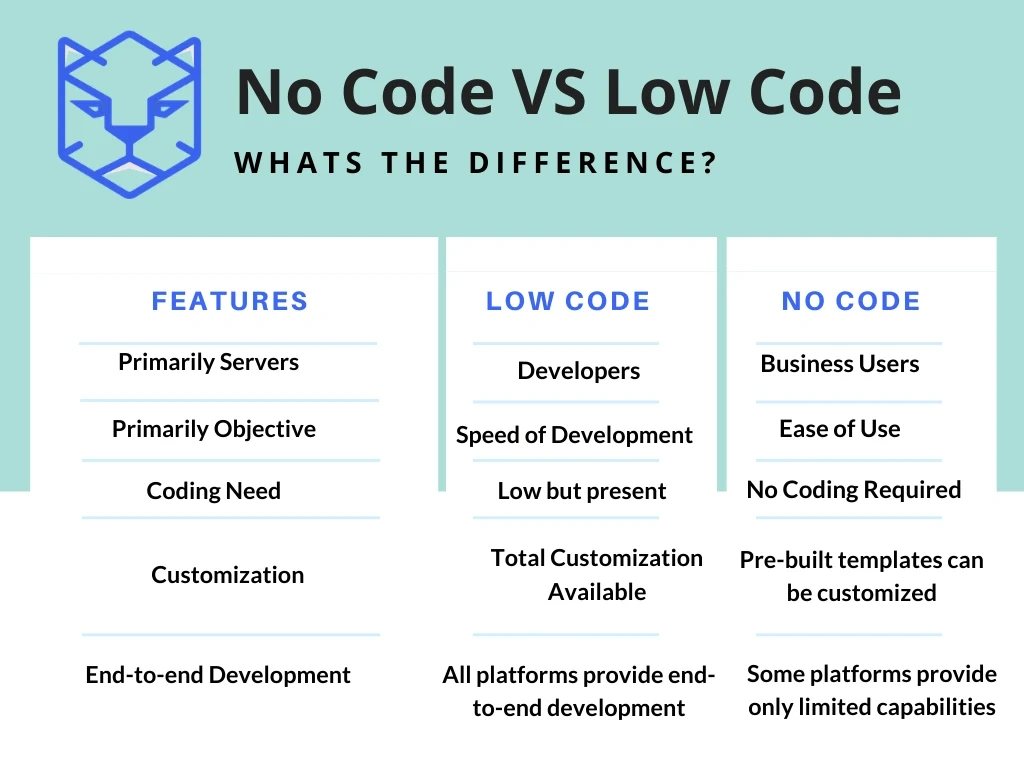
Image Source: TigerSheet
No-code and traditional development are different from each other in many ways. These two approaches show how software gets built, who builds it, and how it changes over time.
Development Speed: Days vs Months
No-code platforms build applications 10 times faster than traditional methods. Traditional projects usually take 6 months to a year, while no-code solutions deliver working applications in days or weeks. Visual interfaces, pre-built components, and drag-and-drop features make this possible by removing the need to write code. Research shows that 72% of low-code users build complete applications in under 3 months. These platforms work great for quick prototypes and market testing.
Customization Limits: Templates vs Full Flexibility
No-code platforms are quick but have limits on customization. They use pre-built templates and components that you can configure instead of building from scratch. Traditional development lets developers create unique interfaces, custom algorithms, and special features that match specific business needs. This freedom becomes crucial for complex projects that need unique business logic or user experiences.
Security and Compliance: Platform vs In-House Control
Security works differently in both approaches. No-code platform providers manage security and usually offer basic protection with limited customization. The platform controls security measures, and users have little say in how they work. Traditional development lets you create specific security measures and compliance strategies that match industry rules like HIPAA or GDPR. Organizations that handle sensitive data or work in regulated industries find this control valuable.
Maintenance and Ownership: Vendor vs Self-Managed
Platform providers handle updates and maintenance for no-code platforms, which makes things easier but reduces control. Users depend on the platform for updates and support, which might lock them in with one vendor. Traditional software needs ongoing maintenance from internal teams or outside help, but you retain control over updates and changes. This self-managed approach gives organizations full ownership of their code and intellectual property, which reduces risks from unexpected platform changes or limits.
When to Use No-Code Tools
No-code platforms have become a practical solution for specific business scenarios and offer advantages over traditional development in certain cases. Let's get into where these visual development environments really shine.
Quick Deployment for Internal Business Apps
Internal business applications showcase one of the best uses for no-code development. Teams can build most internal tools in just 1-4 weeks using no-code platforms, while traditional development takes 3-12 months. These tools cost up to 90% less than custom development.
Teams can build custom apps faster for virtually any internal process—including CRM systems, project management tools, inventory dashboards, HR workflows, and administrative panels. Companies that need to move forward quickly can develop custom apps in just a few hours once their users become familiar with the platforms.
Startups Testing Product-Market Fit
Speed becomes vital for startups proving their ideas right. No-code tools help create MVPs (Minimum Viable Products) in days instead of months. A development team typically needs 4 weeks to 9 months to build a traditional MVP, while teams can build a no-code MVP in days.
Startups can test concepts with real users, gather feedback, and make changes based on what they learn—without heavy investment. Teams find no-code platforms perfect for creating MVPs because they can launch functional products quickly without spending too much time and resources.
Non-Technical Teams Needing Autonomy
No-code platforms give the ability to non-technical users to create solutions that fit their specific needs. Business analysts, designers, and product managers can turn ideas into working prototypes without depending on limited developer resources. This brings domain expertise straight into the development process.
A financial services company doubled its speed in adding new digital capabilities to its customer portal because business teams built most features themselves—without much IT support.
Reducing IT Backlog with Citizen Developers
IT departments struggle with overwhelming requests, and citizen developers are a great way to get help. About 83% of tech leaders have started citizen development programs, and citizen developers will outnumber professional developers 4:1 by 2025.
Organizations using citizen development see a 40% drop in software development costs on average. Project backlogs prevent 72% of IT leaders from tackling strategic projects. Citizen developers help professional developers become force multipliers instead of order takers, so they can focus on complex technical challenges that need real engineering expertise.
When to Choose Traditional Development
No-code alternatives are on the rise, but traditional development remains crucial. You need to know the right time to pick this approach. This will give a solid return on your investment that matches your needs.
Apps Requiring Deep Customization and Performance Tuning
Traditional development gives you unmatched optimization capabilities for applications that need peak performance. Developers can fine-tune resource usage, minimize runtime, and boost overall efficiency with custom code. They can optimize code logic by removing unnecessary function calls, reducing logging operations, and refining loops and conditionals. Applications that need memory management optimization and concurrent processing get significant benefits from the granular control that traditional development provides.
Projects with Complex Data and System Integrations
Data-heavy applications typically need traditional development approaches. Custom solutions excel at managing distributed computing resources with better reliability, performance, and manageability. Traditional relational databases still work best for applications that need persistent storage and complex queries. Applications that connect with multiple systems, including legacy ones, benefit from the flexibility of traditional development.
Long-Term Products with Evolving Requirements
Custom software grows with your business and eliminates the need for pricey migrations or workarounds. Custom software lets you scale without limits through architectural control, unlike off-the-shelf solutions that might fall short as organizations grow. Traditional development creates software that adapts to changing business needs through modifications without vendor restrictions.
Build vs Buy Software Development Considerations
These factors are key when choosing between custom solutions and pre-made options:
- Core expertise requirements and specialized skills needed
- Time-to-market constraints and development timelines
- Integration compatibility with existing systems
- Long-term ROI calculations (custom solutions reach cost parity by year three)
Evaluating the Right Fit for Your Project
Image Source: Quixy
You just need to assess several factors that will determine your project's success when choosing between no-code and traditional development. The right decision at the start saves time, money, and helps you avoid tech problems later.
Budget Constraints and ROI Expectations
Money often drives development choices. No-code platforms can save you a lot, with companies reporting average annual savings of $187,000. On top of that, 60% of companies save between $100K-$200K each year with these solutions. Most businesses see positive ROI within 6-12 months after implementation. Traditional development needs more money upfront but might be more budget-friendly long-term for complex, specialized apps.
Timeline Urgency and Market Readiness
Your time-to-market requirements will shape your tech choices. Teams finish projects using no-code platforms in 3-4 weeks compared to 6-8 months with traditional methods. Teams that utilize no-code solutions work 2.7× faster than conventional development approaches. No-code gives you a big advantage when you want to launch quickly to test ideas or respond to market opportunities.
Team Expertise: Developers vs Business Users
Your team's tech skills should guide your approach. Traditional development needs professional developers with specialized skills, which means higher costs and possible hiring challenges. No-code platforms strengthen business users to create applications without deep programming knowledge. Citizen developers will outnumber professional developers 4:1 by 2026, showing this move toward democratized development.
No-Code Development Limitations to Watch For
No-code platforms have their limits despite the benefits. You might face restricted customization options, scaling issues with large user bases, security concerns with third-party platforms, and vendor lock-in risks. Apps can slow down as they get more complex. Get a full picture of these limitations against your project needs before you commit.
Combining No-Code with Traditional
A hybrid approach offers the best solution for many organizations. This strategy lets developers use no-code to build prototypes and internal tools quickly while using traditional development for complex, customer-facing apps that need extensive customization. No-code can handle front-end interfaces while traditional coding manages complex back-end systems and integrations. Not sure which approach fits your needs? Contact the experts at Kumo to get a personalized assessment of your project requirements.
Conclusion
The choice between no-code and traditional development is a vital decision that shapes your project's success. No-code platforms have grown fast and offer clear advantages - quicker development cycles, easier entry, and cost savings for specific use cases. Businesses that build internal tools, startups proving concepts, and non-technical teams get the most value from these available solutions.
Traditional development still plays a key role in the technology ecosystem. Complex applications need deep customization, sophisticated integrations, and precise performance tuning that just need custom coding approaches. Projects with long-term horizons and evolving requirements make the higher original investment of traditional development worthwhile.
Your unique circumstances will determine the best approach. Budget limits, time pressure, team makeup, and technical needs all play into this key decision. Many organizations find success with a mixed strategy - they use no-code platforms to build prototypes and internal tools while keeping traditional development for complex, customer-facing applications.
Not sure which path matches your project's needs? Reach out to the experts at Kumo for customized guidance that fits your specific requirements. The digital world keeps changing and offers more options than ever before - you just need to find the approach that balances speed, flexibility, and long-term success for your business's goals.
FAQs
Q1. What are the main advantages of using no-code tools? No-code tools offer faster development cycles, lower costs, and empower non-technical users to create applications. They're ideal for quick deployment of internal business apps, rapid prototyping for startups, and reducing IT backlogs through citizen developers.
Q2. When should traditional development be chosen over no-code solutions? Traditional development is preferable for applications requiring deep customization, complex data and system integrations, or long-term products with evolving requirements. It offers more flexibility, control over performance, and better suits projects needing specialized features or compliance with strict regulations.
Q3. How much faster is no-code development compared to traditional methods? No-code development is typically 5-10 times faster than traditional methods for standard applications. Most no-code projects can be completed in weeks rather than the months often required for traditional development.
Q4. Can no-code platforms handle enterprise-level applications? While no-code platforms are capable of creating many business applications, they may have limitations for large-scale, complex enterprise systems. It's important to evaluate the specific requirements of your project, as some enterprise needs might be better served by traditional development or a hybrid approach.
Q5. Is it possible to combine no-code and traditional development approaches? Yes, many organizations adopt a hybrid approach. This strategy allows teams to use no-code for rapid prototyping and internal tools, while employing traditional development for complex, customer-facing applications that require extensive customization or integration with existing systems.
Next step
If you are scoping a build, KUMO delivers custom software development on fixed scopes with the code yours from day one; the founders built Volopay's first production version as its founding engineers. Get a range from the cost calculator or book a free 30-minute call with an engineer.